What is SQL ?
- Relational Database:
- A collection of
data that are
organized as a
set of tables (= relations)
(and can be
accessed
electronically through a
computer system)
- Is the most popular
type of databases
|
- Relational databases are
accessed using
the Structured Query Language,
a.k.a.:
SQL
- SQL is
a (so called)
4th generation
programming language
(or 4GL)
|
1st generation programming language (ca. 1945 - ca. 1949)
- Programmers enters
the program instructions
as binary numbers by
flipping switches:

|
2nd generation programming language (ca. 1949 - ca. 1957)
- Programmers write
program instructions
in (so called) Assembler codes:
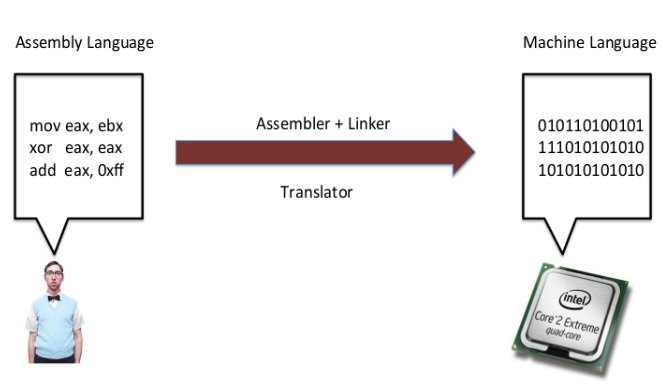
- A (simple) computer program
called the Assembler translates
the assembler codes into
binary machine instructions
|
3rd generation programming language (ca. 1957 - today)
- Programmers write
program instructions
in a
High Level Programming Language
(such as C, Java, etc):
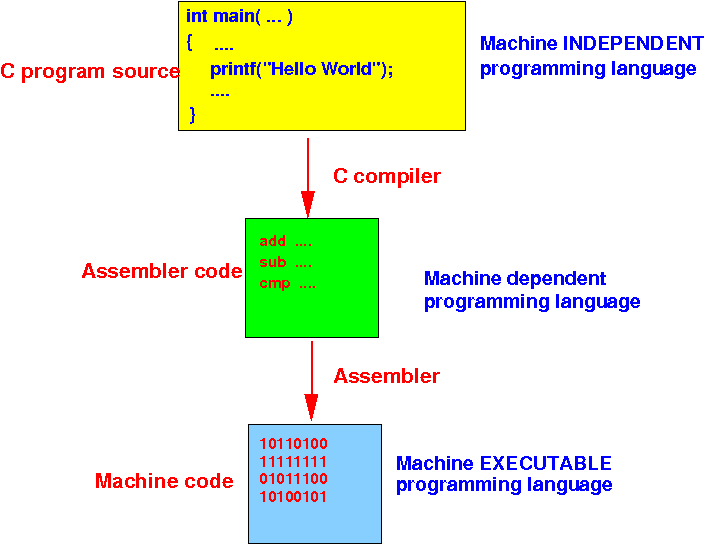
- A (complex) computer program
called the Compiler translates
the program into
assembler codes
|
4th generation programming language (ca. 1972)
- e.g.: SQL
Overview of SQL
- SQL allows the
user to:
- Create a database
- Define the
structure of
the relations (= tables)
in the database
- Insert
tuples
(= rows of data)
into relations (= tables)
- Update
tuples
(= rows of data)
in relations (= tables)
-
Make queries
on the data
stored in the database
|
-
Which type of
request do you think is
the most frequent one ?
|
Overview of SQL
- SQL allows the
user to:
- Create a database
- Define the
structure of
the relations (= tables)
in the database
- Insert
tuples
(= rows of data)
into relations (= tables)
- Update
tuples
(= rows of data)
in relations (= tables)
-
Make queries
on the data
stored in the database
|
- Queries are the
most frequent requests
to a RDBMS !!!
|
The CREATE DATABASE command of
SQL
- SQL command to
create a
database:
create database databaseName
|
- Here's how I created my companyDB
database in MySQL:
create database companyDB
|
|
The CREATE TABLE command of
SQL
- SQL commands to
define a
table (= relation)
in a database is:
 use databaseName       (once only)

 create table tableName
 (attribute-name-1  data-type1,
  attribute-name-2  data-type2,
  ....
 )
|
- Common
data types used:
- varchar(n):
string of maximum of
n characters
- int:
integer (whole number)
- decimal(n,m):
decimal number with
n
digits and
m
decimal places
- date: a
calendar date value (e.g.: 2019-8-15)
|
|
The CREATE TABLE command of
SQL
- Here's how I defined the
employee table
used to store employee information:
 use companyDB          (once only)

 create table employee
 (fname    varchar(10),
  minit    varchar(1),
  lname    varchar(8),
  ssn      varchar(9),
  bdate    date,
  address  varchar(25),
  sex      varchar(1),
  salary   decimal(7,2),
  superssn varchar(9),
  dno      int);
|
|
The INSERT command of
SQL
- SQL command to
insert tuples into a
table in a database:
 use databaseName;          (once only)

 insert into tableName
 values (value1, value2, ... )
|
- Here's how I inserted
the employee
John Smith
into the employee table:
 use database companyDB;

 insert into employee
 values ('John', 'B', 'Smith' ,'123456789' ,'1987-12-1',
  '731 Fondren, Houston, TX', 'M', 30000, '333445555', 5);
|
|
The SELECT command in SQL
- The SELECT
command
in SQL is used to
make query requests
to a RDBMS
- The basic
SELECT command
is as follows:
   select <list of attributes>
   from   <list of relations>
  [where  <tuple-condition>]       ([ ] means: optional)
|
- Effect:
- Retrieves the
specified attribute values
from tuples in the
specified relations
that
satisfy
the tuple-condition
|
|
Example of SELECT commands
with no condition
- Retrieve the first name, middle initial
and last name of
all
employees
|
Example of SELECT commands
with no condition
- Retrieve the first name, middle initial
and last name of
all
employees
 select fname, minit, lname
 from   employee
|
|
Example of SELECT commands
with no condition
- Retrieve
all information of
all
employees
- Note:
* means
all columns
|
Example of SELECT commands
with no condition
- Retrieve
all information of
all
employees
- Note:
* means
all columns
|
Example of SELECT commands
with a simple condition
- Retrieve all information of
employees
in
department #4
|
Example of SELECT commands
with a simple condition
- Retrieve all information of
employees
in
department #4
 select *
 from   employee
where dno = 4
|
|
The result type of
a SELECT command in SQL
- The type of
the result of
a SELECT command
is a
bag of
tuples
- A
bag
is
a collection that
may
contain duplicates
Comment:
- This choice is
based
on efficiency
- It take extra work
(and time) to
remove duplicates from
the result
|
|
Eliminating duplicates in result:
the DISTINCT keyword
- SQL will
not remove
duplicate values in
the result:
- You can use the keyword
distinct to
remove duplicates:
 select distinct dno
 from employee
|
|
Ordering the result:
the ORDER BY clause
- SQL will
not
sort the
the result set by default:
- You can use the order by
clause at the
end of the
query to
sort by
one or more
attribute(s) in the result set:
 select *
 from employee
order by dno, lname, fname
|
|
Limiting the # rows in the result:
the LIMIT clause
- Returning a large number
of records can impact performance.
 select *
 from employee   (Problem if there is a large # employees)
|
- You can use the limit
clause at the
end of the
query to
limit the
number of records (rows)
shown in the output:
 select *
 from employee
 limit 4
|
-
The limit clause
must follow
the
order by clause
|
Note: case-sensitivity
- SQL keywords are
not case-sensitive
- However: people often
use
upper case
for
keywords
|
- Table and
attribute
names are
system dependent !!!
- In MySQL,
table names are
case-sensitive in
Ubuntu Linux !
- However,
attribute names are
case-insensitive in
Ubuntu Linux !
|
- Data stored
in tables are
also
system dependent !!!
- In MySQL,
data stored in tables are
case-insensitive
in Ubuntu Linux
|
|
Note:
you can change the
settings of the
case-sensitivities in
mySQL - see
mySQL Documentation
❮
❯