Review: Key

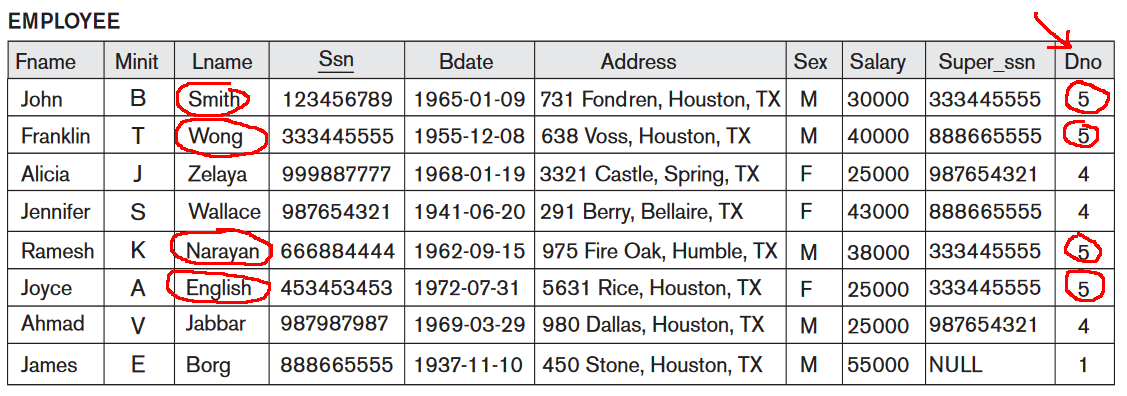
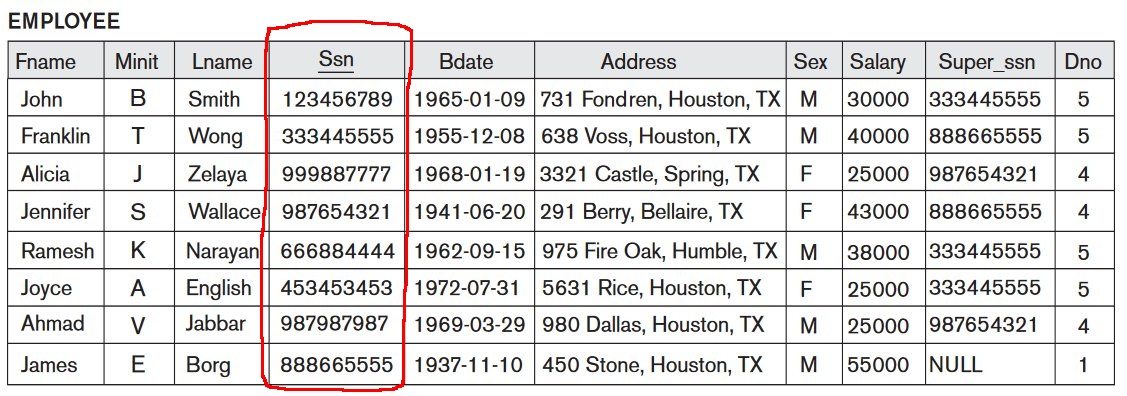
  • Each row in a relation/table must have different values for its key

    Example 1: SSN is a key in the employee relation

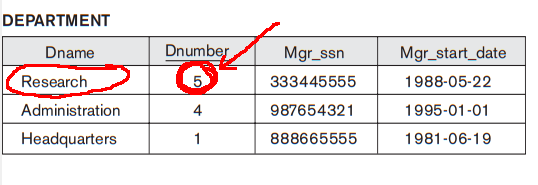
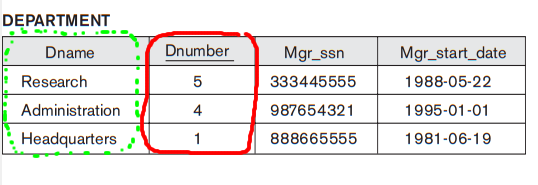
    Example 2: dnumber is a key in the department relation

Linking information between tables

  • Information in different tables can be linked through the use of keys

    Example: dno in employee links to information stored in the department table

Linking information between tables

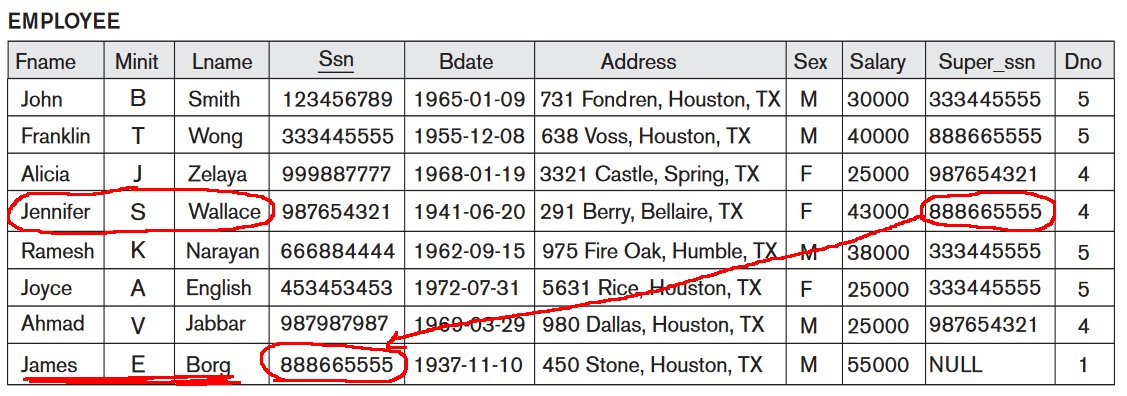
  • Note:   information in the same table can also be linked through the use of keys

    Example: superSSN in employee links to supervisor's information stored
                      in the same table

Linking information between tables using SQL

  • SQL expression to link information in relations/tables R1 and R2:

      SELECT ...
      FROM   R1 join R2 on <join-condition>
     [WHERE  ... ] 

    <join-condition> specifies the condition when the rows in each relation/table will be joined

  • Example:

      SELECT *
      FROM   employee join department on dno = dnumber 

    Join the rows in employee and department when dno = dnumber

Sample queries using join

Use the company database when formulating the following queries:

  • Find fname, lname of employees in the Research department

  • Find the name of the department where John Smith works

  • For each employee, list the fname, lname of the employee and the name of all his/her dependents

  • List the names of the dependents of the employee John Smith

Ambiguous attribute names


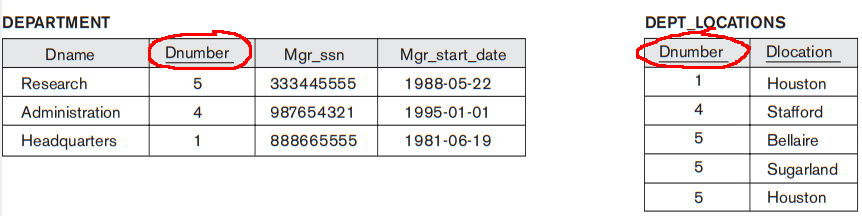
  • Different relations/tables can have an attribute (column) with the same attribute name

    Example: dnumber in department and dept_loc

  • Try to formulate this query:

    • List all the department names and their locations

Resolving ambiguous attribute names


  • Illegal query to list all the department names and their locations:

     select dname, dlocation
     from department join dept_loc on dnumber=dnumber 

    because dnumber is ambiguous

  • Solution:   qualify an ambiguous attribute name with its relation name:

     select dname, dlocation
     from department join dept_loc on
          department.dnumber=dept_loc.dnumber 

Try this (pretty tough) query

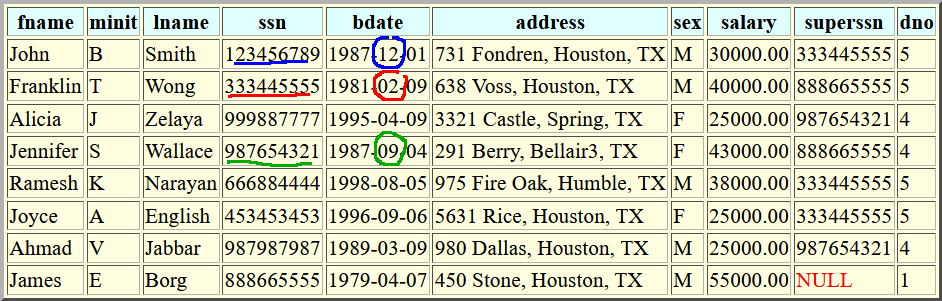
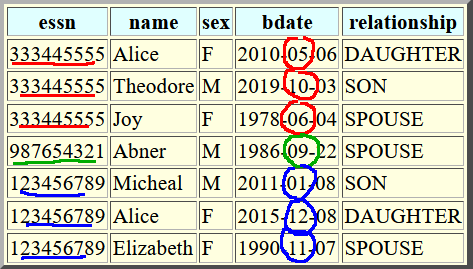
  • Find fname, lname of employees who has a dependent born in the same month as the employee

      Employee:

      Dependent:

Ambiguous relation names

  • Some queries will require the use of the same relation more than once

  • Example:

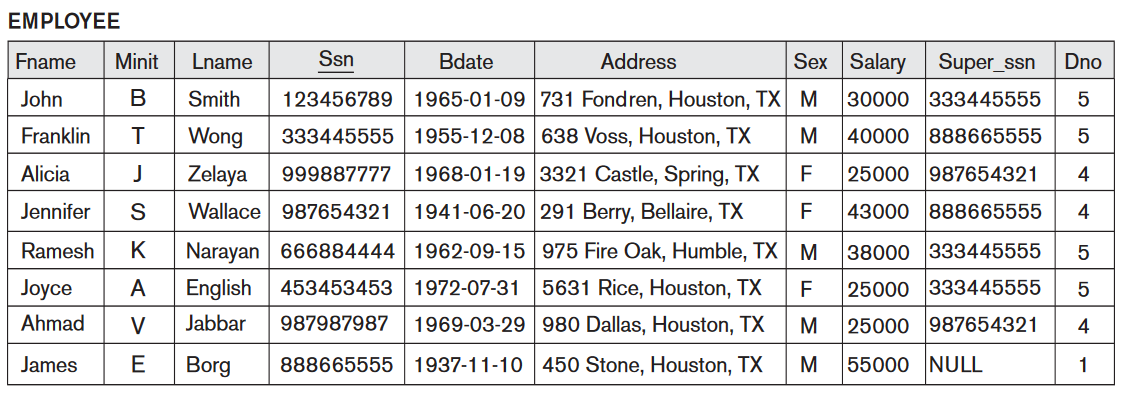
      • List the fname, lname of all employee along with the fname, lname of their supervisor (for only employees who has a supervisor)

Resolving ambiguous relation names: aliasing

  • You can rename a relation with an alias

    After renaming, use the alias to qualify the attributes

  • Example:

      • List the fname, lname of all employee along with the fname, lname of their supervisor (for only employees who has a supervisor)

    Attempt at a solution:

     select fname, lname, fname, lname
     from   employee join employee on superssn = ssn 
    employee is the employee in the supervisor role !!

Resolving ambiguous relation names: aliasing

  • You can rename a relation with an alias

    After renaming, use the alias to qualify the attributes

  • Example:

      • List the fname, lname of all employee along with the fname, lname of their supervisor (for only employees who has a supervisor)

    Solution:

     select E.fname, E.lname, S.fname, S.lname
     from   employee E join employee S on E.superssn = S.ssn 
    employee is the employee in the supervisor role !!