Python Pandas - DataFrame
|
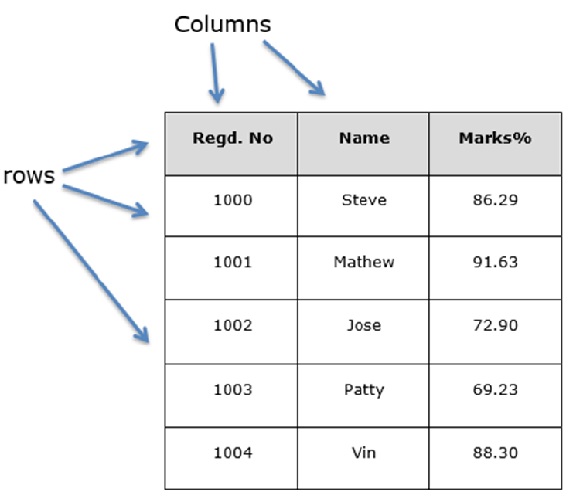
Constructor
|
Examples of the use of the
DataFrame( )
constructor
Data = a list of numbers
data = [10,20,30]
df = pd.DataFrame(data)
0
0 10
1 20
2 30
|
DEMO: progs/df01.py
Examples of the use of the
DataFrame( )
constructor
 Data = a list of lists

    data = [ ['Alex',10, 1, 1], ['Bob',12, 1, 1], ['Clarke',13, 1, 1] ]

    df = pd.DataFrame(data)

            0   1  2  3
    0    Alex  10  1  1
    1     Bob  12  1  1
    2  Clarke  13  1  1
|
DEMO: progs/df01.py
Examples of the use of the
DataFrame( )
constructor
index specified:
data = [ ['Alex',10], ['Bob',12], ['Clarke',13] ]
df = pd.DataFrame(data, index=['a','b','c'])
0 1
a Alex 10
b Bob 12
c Clarke 13
|
DEMO: progs/df01.py
Create a DataFrame from
Dict
of Lists
No index specified:
data = {'Name':['Tom', 'Jack', 'Steve'], 'Age':[28,34,29]} # Dict of lists
df = pd.DataFrame(data)
Name Age
0 Tom 28
1 Jack 34
2 Steve 29
|
DEMO: progs/df02.py
Create a DataFrame from Dict of Lists
with a
columns parameter
The columns parameter can change the column order:
data = {'Name':['Tom', 'Jack', 'Steve'], 'Age':[28,34,29]} # Dict of lists
df = pd.DataFrame(data, columns=['Age','Name'])
Age Name
0 28 Tom
1 34 Jack
2 29 Steve
|
DEMO: progs/df02.py
Create a DataFrame from a
List of
Dicts
No index specified:
data = [ {'a': 1, 'b': 2}, {'a': 5, 'b': 10, 'c': 20} ] # List of dict
df = pd.DataFrame(data)
a b c
0 1 2 NaN
1 5 10 20.0
|
DEMO: progs/df03.py
Create a DataFrame from a List of Dicts
with a
columns parameter
The columns parameter can change the column order:
data = [ {'a': 1, 'b': 2}, {'a': 5, 'b': 10, 'c': 20} ] # List of dict
df = pd.DataFrame(data, columns=['c','b','a'])
c b a
0 NaN 2 1
1 20.0 10 5
|
DEMO: progs/df03.py
Selecting one or more
columns
Use: df['colName']
data = [ ['Alex',10], ['Bob',12], ['Clarke',13] ]
df = pd.DataFrame(data, columns=['x','y'])
print( df['x'] )
0 Alex
1 Bob
2 Clarke
|
DEMO: progs/df04.py
Adding and
deleting a column
Add a column: df['newCol'] = [ x1, x2, ... ] # Must have correct length
data = [ ['Alex',10], ['Bob',12], ['Clarke',13] ]
df = pd.DataFrame(data, columns=['x','y'])
df['z'] = [10,20,30]
x y z
0 Alex 10 10
1 Bob 12 20
2 Clarke 13 30
|
DEMO: progs/df04.py
Selecting a row
by label
 Use: df.loc['rowIndex']   or  df.loc[['row1', 'row2', ...]]

    data = [ ['Alex',10], ['Bob',12], ['Clarke',13] ]

    df = pd.DataFrame(data, columns=['x','y'], index=['a','b','c'])

    df:
            x   y
    a    Alex  10
    b     Bob  12
    c  Clarke  13

    print( df.loc['b'] )              print( df.loc[ ['b','a'] ] )

    df.loc['b']:                      df.loc[ ['b','a'] ]:
                x    Bob			              x   y
                y     12                                b   Bob  12
                                                        a  Alex  10
|
Selecting a row
by iloc
Use: df.iloc[n] or df.iloc[[n1, n2, ...]]
data = [ ['Alex',10], ['Bob',12], ['Clarke',13] ]
df = pd.DataFrame(data, columns=['x','y'], index=['a','b','c'])
df:
x y
a Alex 10
b Bob 12
c Clarke 13
print( df.iloc[1] ) print( df.iloc[ [1,0] ] )
df.iloc[1]: df.iloc[ [1,0] ]:
x Bob x y
y 12 b Bob 12
a Alex 10
|
Adding and
deleting a row
Add a new row to a DataFrame:
(1) Create a new DataFrame:
a = {'x':['SY'], 'y':[99]} # New row
b = pd.DataFrame(a, index=['d']) # Create DataFrame with row
(2) Concat to existing DataFrame:
df = pd.concat([df, b])
df:
x y
a Alex 10
b Bob 12
c Clarke 13
d SY 99
|