- Switch
- Probe
- And gate (other basic gates are similar)
- Decoder
- D-flipflop
- Register
- Side track:
- Range notation used in logic-sim: click here
- Using One and Zero as input: click here
- Multiplexor
- ROM (Read Only Memory)
- Switch:
- A switch is the
only input device in
the circuit simulation
- A switch is a device that you can turn on or off using a particular key on the keyboard
- A switch is the
only input device in
the circuit simulation
- Syntax:
   Switch ( Coord, OutputSignal, Key, InitState )

      Coord        = coordinate of the component
      OutputSignal = output signal of the switch
      Key          = key on keyboard used to toggle the switch
      InitState    = initial state (One or Zero)

   A switch does not have any inpiy signals
   You can change the state of a switch by toggling the key
- Example:
#include "Sim.h"

void simnet()
{
  Sig(x,1);             // Define x as a signal
  Sig(y,1);             // Define x as a signal

  Switch ( "aa", x, 'a', Zero );  // Initial value: Zero
  Probe ( "ac", x );              // Probe x

  Switch ( "ca", y, 'b', One );   // Initial value: One
  Probe ( "cc", y );              // Probe y

}
- Example Program:
(Demo above code)

- Prog file: click here
How to run the program:
- Right click on link and
save in a scratch directory
- To compile: cs355sim switch
- To run: ./simex
- Probe:
- A probe is the
output device in
a circuit simulation
- A probe will show the current value of some (input) signal
- A probe is a
light depicted
as a rectangle:
- A unfilled rectangle represents the Zero value
- A filled rectangle represents the One value
- A probe is the
output device in
a circuit simulation
- Syntax:
   Probe ( Coord, InputSignal )

      Coord        = coordinate of the component
      InputSignal  = input signal of the probe


   A probe does not have any output signals
   The output of a probe is the light of the probe...
- Example:
#include "Sim.h"

void simnet()
{
  Sig(x,1);             // Define x as a signal
  Sig(y,1);             // Define x as a signal

  Switch ( "aa", x, 'a', Zero );  // Initial value: Zero
  Probe ( "ac", x );              // Probe x

  Switch ( "ca", y, 'b', One );   // Initial value: One
  Probe ( "cc", y );              // Probe y

}
- Example Program:
(Demo above code)
- Prog file: click here
How to run the program:
- Right click on link and
save in a scratch directory
- To compile: cs355sim switch
- To run: ./simex
- Fact:
- Many of the components in logic-sim must use multiple signals as input
- Signal group:
- Signal group =
a number of signals
group together as follows:
(signal1, signal2, ..., signalN)
- A signal group is counted as one (single) signal
Note:
- A signal group is
similar to a
compound statement in
Java:
    {
       Statement1;
       Statement2;
       ...
       StatementN;
    }
- A compound statement is counted as one single statement !!!
- Signal group =
a number of signals
group together as follows:
- Many of the
components in
logic-sim can use
signal groups as
parameters
- Previously:
  void simnet()
  {
    Sig(x,1);             // Define x as a signal
    Sig(y,1);             // Define x as a signal

    Switch ( "aa", x, 'a', Zero );  // Initial value: Zero
    Probe ( "ac", x );              // Probe x

    Switch ( "ca", y, 'b', One );   // Initial value: One
    Probe ( "cc", y );              // Probe y

  }
The Probe component can use signal group as input:
   void simnet()
   {
     Sig(x,1);             // Define x as a signal
     Sig(y,1);             // Define x as a signal

     Switch ( "aa", x, 'a', Zero );  // Signal 1
     Switch ( "ca", y, 'b', One );   // Signal 2

     Probe ( "ac", (x,y) );          // Probe using signal group as input
   }
- Example Program:
(Demo above code)
- Prog file: click here
How to run the program:
- Right click on link and
save in a scratch directory
- To compile: cs355sim switch2
- To run: ./simex
- If you want to display
some signals horizontally,
you can use the
Horizontal Probe component:
ProbeH ( Coord, Signals ) ;Example:
   void simnet()
   {
     Sig(x,1);             // Define x as a signal
     Sig(y,1);             // Define y as a signal
     Sig(z,1);             // Define z as a signal

     Switch ( "aa", x, 'a', Zero );  // Signal 1
     Switch ( "ba", y, 'b', One );   // Signal 2
     Switch ( "ca", z, 'c', One );   // Signal 3

     ProbeH( "ac", (x,y,z) );        // HORIZONTAL probe
   }
- Example Program:
(Demo above code)
- Prog file: click here
How to run the program:
- Right click on link and
save in a scratch directory
- To compile: cs355sim probeH
- To run: ./simex
- And gate:
- An And-gate is a circuit that
performs the
AND function
in hardware (circuitry)
The following is the operation of a two inputs and-gate:

- An And-gate in
logic-sim has
one
input signal
and
one
output signal
- You can have
multiple input signals
to the And-gate
by using the
signal grouping notation:
( signal1, signal2, ..... ) == one signal !!!
- The output signal is equal to the And-function of all the input signals
- You can have
multiple input signals
to the And-gate
by using the
signal grouping notation:
- An And-gate is a circuit that
performs the
AND function
in hardware (circuitry)
- Syntax:
   And ( Coord, InputSignal, OutputSignal  )

      Coord        = coordinate of the component
      InputSignal  = input signal of the And-gate
      OutputSignal = output signal of the And-gate


   Commonly used form:

      And ( Coord, ( inp1, inp2, inp3, ... ), Output ) ;
- Example:
#include "Sim.h"

void simnet()
{
  Sig(sw0,1);           // Define sw0 as a signal
  Sig(sw1,1);           // Define sw1 as a signal
  Sig(out,1);           // Define out as a signal

  Switch ( "aa", sw0, 'a', Zero );  // Location = "aa", name = sw0, key = 'a'
  Switch ( "ca", sw1, 'b', One );   // Initial value: Zero or One

  And  ( "bb", (sw0,sw1), out );    // And: inputs = (sw0,sw1), output = out

  // Note:  ( .., .. )   group signals into 1 signal
  // Note:  sw0 is equivalent to sw0[0]

  Probe ( "bc", out );              // Probe out
}
- Example Program:
(Demo above code)
- Prog file: click here
How to run the program:
- Right click on link and
save in a scratch directory
- To compile: cs355sim and
- To run: ./simex
- Other basic gates:
    And ( .... )         And gate
    Or  ( .... )         Or gate
    Not ( .... )         Not gate
    Nand( .... )         Nand gate
    Nor ( .... )         Nor gate
    Xor ( .... )         Exclusive Or gate
    Xnor( .... )         Exclusive Nor gate
- Decoder:
- A decoder is a circuit
that translates a set of
control signals into
output signals.
Example:

- An decode in
logic-sim has
- An enable signal
- k control signals
- 2k output signals
Operation:
- If enable = Zero,
then all output signals are
equal to
Zero
- So if enable = Zero, no selection is made !!!
- Otherwise,
for each combination of
control signals,
exactly
one
output signal will
be equal to ONE and
all other output signals
are equal to ZERO
- So if enable = One, the control signals will make exactly one selection !!!
- A decoder is a circuit
that translates a set of
control signals into
output signals.
- Syntax:
   Decoder ( Coord, enable, controls, outputs );

      Coord        = coordinate of the component
      enable       = the enable signal of the Decoder
      controls     = the control signals
      outputs      = the output signals

   Reqirement:

          # output signals = 2# control signals


   Commonly used syntax form:

      Decoder ( Coord, enable, ( ..., c1, c0 ), (..., o1, o0 ) ) ;
- Example: a 2x4 decoder
   #include "Sim.h"

   void simnet()
   {
     Sig(c0,1); Sig(c1,1);                        // Control signals
     Sig(o0,1); Sig(o1,1); Sig(o2,1); Sig(o3,1);  // Output signals
     Sig(enable,1);

     Switch( "fa", c1, 'b', Zero );
     Switch( "ga", c0, 'a', Zero );
     Switch( "ia", enable, 'z', Zero );

     /* ============================================================
   	     c1 c0            Output
   	    ----------------------------------------------------
   	      0  0             o0 = 1, all other outputs = 0
   	      0  1             o1 = 1, all other outputs = 0
   	      1  0             o2 = 1, all other outputs = 0
   	      1  1             o3 = 1, all other outputs = 0
   	============================================================ */
     Decoder ( "ab-db", enable, (c1,c0), (o3,o2,o1,o0) );  // Decoder

     Probe ( "ac", o3 );              // Probe output
     Probe ( "bc", o2 );              // Probe output
     Probe ( "cc", o1 );              // Probe output
     Probe ( "dc", o0 );              // Probe output
   }
- Example Program:
(Demo above code)
- Prog file: click here
How to run the program:
- Right click on link and
save in a scratch directory
- To compile: cs355sim decoder
- To run: ./simex
- D-flipflop:
- The D-flipflop in
logic-sim is a
one-bit
memory circuit with
2 extra controls:
Schematically:
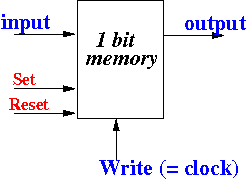
- A D-flipflop in
logic-sim has
- A set signal
- A reset signal
- One input signals
- One output signals
- One write (= clock) signal
Operation:
- If set = One,
then the output of the
D-flipflop is
always equal to
the value
One
- If reset = One,
then the output of the
D-flipflop is
always equal to
the value
Zero
- The set and reset signals are used to force a value into the D-flipflop
- If set = Zere and
reset = Zero, then
it operates as
the D-flipflop discussed in
class:
- The input value is written to the output of the D-flipflop when a clock (up and down) is given to the Write signal
- The D-flipflop in
logic-sim is a
one-bit
memory circuit with
2 extra controls:
- Syntax:
   Dff ( Coord, (set, D, clock, reset), Q );

      Coord   = coordinate of the component
      set     = the set signal
      D       = the input (1 bit) of the D-flipflop
      clock   = the clock used to write the D-flipflop
      reset   = the reset signal
      Q       = the output of the D-flipflop
- Example:
   void simnet()
   {
     Sig(set,1);  Sig(reset,1);        // Special control signals
     Sig(D,1);    Sig(Q,1);            // D = Dff input, Q = Dff output
     Sig(clock,1);                     // Clock signal

     Switch( "aa", D,  '0', Zero );

     Switch( "fa", set,   'b', Zero );
     Switch( "ga", reset, 'a', Zero );
     Switch( "ia", clock, 'z', Zero );

     /* ============================================================
   	  reset (a) = 1 ==> force Dff output to 0
   	  set (b)   = 1 ==> force Dff output to 1

   	  reset = 0 AND set = 0 ==> Operate like a normal Dff

   	       D = data in
   	       Clock = write signal for Dff
   	       Q = output of Dff
   	============================================================ */
     Dff ( "ab-hb", (set,D,clock,reset), Q );  // D-flipflop

     Probe ( "ac", Q );              // Probe output
   }
- Example Program:
(Demo above code)
- Prog file: click here
How to run the program:
- Right click on link and
save in a scratch directory
- To compile: cs355sim Dff
- To run: ./simex
- Note:
- The reset function of the
D-flipflop is
very useful for
initializing the
memory element to
the value Zero
- You will need to use the reset function to reset the Program Counter register (Register 0) to zero in your project
- The reset function of the
D-flipflop is
very useful for
initializing the
memory element to
the value Zero
- Register:
- A register is serie of
D-flipflops
In other words: a register is an n-bits memory circuit
Note:
- The
difference between a
register and a
D-flipflop is the
set/reset controls:
- A register does not have set/reset controls.....
- The
difference between a
register and a
D-flipflop is the
set/reset controls:
- A register in
logic-sim has
- An enable signal
- A write signal
- A number of input signals
- The same number of output signals
Operation:
- If enable = Zero,
then the register is
inactive
- The value of the register will remain constant when the register is inactive
- If
enable = One, then
the register can be
written using the
write signal:
- When write signal changes from Zero ⇒ One, the input of the register will be written to the output
- A register is serie of
D-flipflops
- Syntax:
   Register ( Coord, enable, wr, inputs, outputs );

      Coord   = coordinate of the component
      enable  = enable signal
      wr      = write signal
      inputs  = the input signals of the register
      outputs = the output signals of the register


  Commonly used syntax form:

       Register ( Coord, One, wr, (..., i1, i0), (..., o1, o0) );

  because you usually have multiple inputs and outputs
- Example:
void simnet()
{
  Sig(d,8);              // Input (data) signals for register
  Sig(o,8);              // Output signals of register
  Sig(enable,1);         // Enable signal
  Sig(wr,1);             // Write signal

  Switch( "aa", d[7], '7', Zero );
  Switch( "ba", d[6], '6', One );
  Switch( "ca", d[5], '5', Zero );
  Switch( "da", d[4], '4', Zero );
  Switch( "ea", d[3], '3', One );
  Switch( "fa", d[2], '2', Zero );
  Switch( "ga", d[1], '1', Zero );
  Switch( "ha", d[0], '0', One );

  Switch( "jb", enable, 'a', Zero );
  Switch( "jc", wr, 'b', Zero );

  /* ============================================================
     Register
        Write with wr = 1
        Write only happens when enable = 1
     ============================================================ */
  Register ( "ab-hb", enable, wr,
             (d[7],d[6],d[5],d[4],d[3],d[2],d[1],d[0]),
             (o[7],o[6],o[5],o[4],o[3],o[2],o[1],o[0])
           );

  Probe( "ad-hd", o);           // Probe output
}
- Example Program:
(Demo above code)
- Prog file: click here
How to run the program:
- Right click on link and
save in a scratch directory
- To compile: cs355sim register
- To run: ./simex
- Note:
- You cannot reset a register....
- Range Notation (short hand):
   ( x[i]-x[j] )    is equavalent to:

         ( x[i], x[i+1], ... , x[j] )  if  i ≤ j
   or:   ( x[i], x[i-1], ... , x[j] )  if  i ≥ j
Example:
- Instead of writing:
  Register ( "ab-hb", enable, wr,
             (d[7],d[6],d[5],d[4],d[3],d[2],d[1],d[0]),
             (o[7],o[6],o[5],o[4],o[3],o[2],o[1],o[0])
           );
we can write:
  Register ( "ab-hb", enable, wr,
             (d[7]-d[0]),
             (o[7]-o[0])
           );
- Instead of writing:
- Example Program:
(Demo above code)
- Prog file: click here
How to run the program:
- Right click on link and
save in a scratch directory
- To compile: cs355sim range1
- To run: simex
- Special range notation:
all signals in
the array
   Suppose we define an array of N signals:

        Sig( x, N );


   Special range notation:

       x      is equavalent to:    ( x[N-1], ..., x[1], x[0] )
Example:
- Instead of writing:
  Sig(d, 8);
  Sig(o, 8);

  Register ( "ab-hb", enable, wr, (d[7]-d[0]), (o[7]-o[0]) );
we can write:
  Sig(d, 8);
  Sig(o, 8);

  Register ( "ab-hb", enable, wr, d, o );
- Instead of writing:
- Example Program:
(Demo above code)
- Prog file: click here
How to run the program:
- Right click on link and
save in a scratch directory
- To compile: cs355sim range2
- To run: simex
- Fact:
- The signal constants One and Zero can be used as inputs to circuits !!!
Example: if we want to always enable a register
Register ( "ab-hb", One, wr, d, o );
- Example Program:
(Demo above code)
- Prog file: click here
How to run the program:
- Right click on link and
save in a scratch directory
- To compile: cs355sim register2
- To run: ./simex
- Multiplexor:
- A multiplexor switch
N inputs onto
one output
Example:

- A multiplexor switch
N inputs onto
one output
- Syntax:
   Mux ( Coord, Controls, Inputs, Outputs )

      Coord    = coordinate of the component
      Controls = k control signals of the Mux
      Inputs   = 2k groups of input signals of the Mux
      Outputs  = one group of the input groups is selected
                 as output group
Requirement:
- The number of input signals must be equal to 2k where k is the the number of control signals
- Example:
void simnet()
{
  Sig(i0,1); Sig(i1,1); Sig(i2,1); Sig(i3,1);  // Input signals
  Sig(c0,1); Sig(c1,1);                        // Control signals
  Sig(out,1);                                  // Output signal

  Switch( "aa", i3, '3', Zero );
  Switch( "ba", i2, '2', Zero );
  Switch( "ca", i1, '1', Zero);
  Switch( "da", i0, '0', One );

  Switch( "fa", c1, 'b', Zero );
  Switch( "ga", c0, 'a', Zero );

  /* ==========================================
          c1 c0            Output
         --------------------------
           0  0             i0
           0  1             i1
           1  0             i2
           1  1             i3
     ========================================== */
  Mux ( "ab-db", (c1,c0), (i3,i2,i1,i0), out );  // Mux !!!

  Probe ( "bc", out );              // Probe out
}
Notice that:
- There are k = 2
control signals:
- c0 and c1
- Correspondingly,
there are
2k
input signals:
- i0, i1, i2 and i3
-
Otherwise, the
simulation
will report an error:
I/O length error--Mux
Sample output:

- There are k = 2
control signals:
- Example Program:
(Demo above code)
- Prog file: click here
How to run the program:
- Right click on link and
save in a scratch directory
- To compile: cs355sim mux1
- To run: ./simex
- Special note:
- The multiplexor provided in
logic-sim is very power:
- The logic-sim multiplexor can multiple a group of signals !!!
Example:
Mux ( "ab-db", (c1,c0), ( (i7,i6), (i5,i4), (i3,i2), (i1,i0) ), (out1, out0) ) ;
Effect:
- If (c1=0,c0=0), the output (out1,out0) is equal to (i1,i0)
- If (c1=0,c0=1), the output (out1,out0) is equal to (i3,i2)
- If (c1=1,c0=0), the output (out1,out0) is equal to (i5,i4)
- If (c1=1,c0=1), the output (out1,out0) is equal to (i7,i6)
- The multiplexor provided in
logic-sim is very power:
- Example Program:
(Demo above code)
- Prog file: click here
How to run the program:
- Right click on link and
save in a scratch directory
- To compile: cs355sim mux2
- To run: simex
- Note for the project:
- You can use this special ability
of the multiplexor to
switch
all bits from
all registers to one
input of the
ALU using
only one single
multiplexor:
mux ( ..., (R16, R15, ...., R1, R0), ALU_Input1 );
(I am using the special range notation for the registers --- see: click here !!!)
- You can use this special ability
of the multiplexor to
switch
all bits from
all registers to one
input of the
ALU using
only one single
multiplexor:
- ROM:
- A read-only memory
computer memory that contains a set of
binary value which
cannot be
changed
Example:
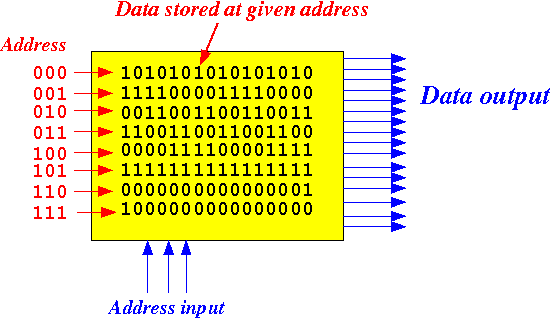
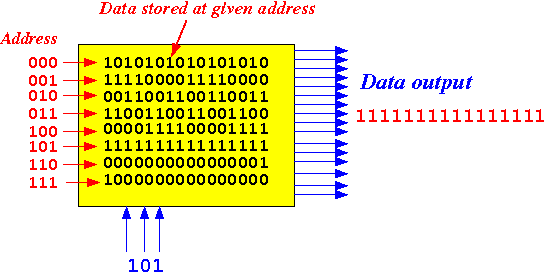
- When the ROM
receive an address,
it will
output the
binary value stored
at that
address
Example:
Note:
- We use the ROM component to
store:
- micro-instructions and
- assembler program instructions
- We use the ROM component to
store:
- A ROM in
logic-sim has:
- A group of address signals
- A group of data (output) signals
- The number of entries stored in the ROM
- The number of bits of an entry in the ROM
Operation:
- The ROM output is equal to the data entry at the given address in the ROM
- A read-only memory
computer memory that contains a set of
binary value which
cannot be
changed
- Syntax:
   ROM ( Coord, addrs, outputs, #entries, #bits, RomContent );

      Coord      = coordinate of the component
      addrs      = address signals
      outputs    = the output signals of the ROM
      #entries   = # entries stored in the ROM
                   Must equal to 2#addrs
      #bits      = # bits in the output signals of the ROM
      RomContent = Byte array used to store the values of the ROM entries
- Storing the entries
(bit patterns) of the ROM:
- The values stored in to
ROM is
given in the byte array parameter
byte RomContent[ ]
- If the # bits of the entries is 8 bits, then you use 1 byte of the array per entry
- If the # bits of the entries is 16 bits, then you use 2 bytes of the array per entry
- And so on....
Example:
- To store the following entries:
we use the following byte array:
  unsigned char RomContent[] = {
                                 0b10101010, 0b10101010,   // Word 0
                                 0b11110000, 0b11110000,   // Word 1
                                 0b00110011, 0b00110011,   // Word 2
                                 0b11001100, 0b11001100,   // Word 3
                                 0b00001111, 0b00001111,   // Word 4
                                 0b11111111, 0b11111111,   // Word 5
                                 0b00000000, 0b00000001,   // Word 6
                                 0b10000000, 0b00000000};  // Word 7
- The values stored in to
ROM is
given in the byte array parameter
byte RomContent[ ]
- Example:
   void simnet()
   {
     /* ==============================================
   	ROM contains 8 words, each word has 16 bits
   	============================================== */
     unsigned char RomContent[] = {
   				    0b10101010, 0b10101010,   // Word 0
   				    0b11110000, 0b11110000,   // Word 1
   				    0b00110011, 0b00110011,   // Word 2
   				    0b11001100, 0b11001100,   // Word 3
   				    0b00001111, 0b00001111,   // Word 4
   				    0b11111111, 0b11111111,   // Word 5
   				    0b00000000, 0b00000001,   // Word 6
   				    0b10000000, 0b00000000};  // Word 7

     Sig(addr,3);           // Address signals
     Sig(out,16);            // Output signals

     Switch( "fa", addr[2], '2', Zero );
     Switch( "fb", addr[1], '1', Zero );
     Switch( "fc", addr[0], '0', Zero );

     /* ============================================================
   	Rom with 3 address bits and 8 data bits

   	Requirement:
   	     1. # words = 2^(size of addr)
   	     2. # bits  = size of out
   	============================================================ */
     Rom ( "bb-db", addr, out, 8 /* # words */, 16 /* # bits in a word */,
   	    RomContent );

     ProbeH( "aa-ad", out);           // Probe output
   }
- Example Program:
(Demo above code)
- Prog file: click here
How to run the program:
- Right click on link and
save in a scratch directory
- To compile: cs355sim rom
- To run: ./simex
- We can use a more concise
notation by writing the
binary value in
a different number system
Example: using Hexadecimal notation
   void simnet()
   {
     /* ==============================================
   	ROM contains 8 words, each word has 16 bits
   	============================================== */
     unsigned char RomContent[] = {
   				    0xAA, 0xAA,    // Word 0
   				    0xF0, 0xF0,    // Word 1
   				    0x33, 0x33,    // Word 2
   				    0xCC, 0xCC,    // Word 3
   				    0x0F, 0x0F,    // Word 4
   				    0xFF, 0xFF,    // Word 5
   				    0x00, 0x01,    // Word 6
   				    0x80, 0x00};   // Word 7

     Sig(addr,3);           // Address signals
     Sig(out,16);            // Output signals

     Switch( "fa", addr[2], '2', Zero );
     Switch( "fb", addr[1], '1', Zero );
     Switch( "fc", addr[0], '0', Zero );

     /* ============================================================
   	Rom with 3 address bits and 8 data bits

   	Requirement:
   	     1. # words = 2^(size of addr)
   	     2. # bits  = size of out
   	============================================================ */
     Rom ( "bb-db", addr, out, 8 /* # words */, 16 /* # bits in a word */,
   	    RomContent );
   				      // Rom

     ProbeH( "aa-ad", out);           // Probe output
   }
- Example Program:
(Demo above code)
- Prog file: click here
How to run the program:
- Right click on link and
save in a scratch directory
- To compile: cs355sim rom2
- To run: ./simex