- Logic elements and Boolean Algebra
- Types of circuits:
click here
- Intro to Digital circuits:
click here
- Elementary digital circuits:
click here
The Logic Simulator used in this course
(by Richard Reid of Michigan State Univ):
- How to setup your account to use logic-sim:
click here
- How to define a digital circuit for logic-sim:
click here
- Grid coordinate system used in logic-sim:
click here
- Intro to combinatorial circuits:
click here
- Boolean Algebra and digital circuits:
click here
- Combinatorial circuit design:
click here
Assign project 1 to re-inforce circuit design:
- You will need to learn about the logic-simimular from this handout:
click here
- And do the project assignment 1:
click here...
- Example circuit design: Add 1 to a two bit binary numbers -
click here
- Example circuit design: Adding two 2-bits binary numbers -
click here
- Switching Circuits... how is the CPU wired...
- You may have heard that a computer is one big switch...
you will soon find out why.....
- Many-to-one digital switching circuit - multiplexor:
click here
- Example use of a (many-to-one) multiplexor:
switching registers to ALU -
click here
- One-to-many digital switching circuit - decoder/demultiplexor:
click here
- Example use of a decoder: select a register for writing:
click here
- Register → ALU → Register transfer:
click here
- Little detour, the real one-to-many switching circuit:
click here
- Arithmetic (and Logic) Circuits.... see what the ALU look like
- Sequential Circuits
- Finite State Machines (class notes, not in book)
- Constructing FSA with digital circuitry:
click here
- Side note:
- A computer is a FSA, with a huge number of states
- The number of states is equal to 2N
where N is the number of bits of memory in the main memory
and other storage (disks, tapes, CD-roms, etc)
- Bi-directional Transfer (class notes, not in book)
- Memory Organization
- CPU Micro Architecture
- Micro-programming:
- Introduction to micro-programming:
click here
- Micro-program flow control:
click here
- Register numbering:
click here
- The complete micro-program:
click here
- Step 1 of the instruction execution cyle (fetch instruction):
click here
- Steps 2, 3 and 4 of the instruction execution cyle (decode to execute ):
click here
- Demo: run the complete computer with command
"cs355-demo-computer"
- Final notes:
click here
Is you understand everything so far, congrats...
You now know exactly how the computer works when
it executes a program.
The only thing that you don't know about the computer is how
the CPU and memory (and IO devices) communicate with each other.
We will fix that next....
- The system bus:
- IO Communication
You should now know how the entire computer works.
The only things left to discuss are the bells and whistles that
make the computer runs faster (and safer)...
- Pipeline design
- The RISC phylosophy
- Modification to simplify pipeline design:
- Fixed size instruction
- Limited number of instructions that access memory.
Only the following instructions will access memory:
- ld: load (read data from memory)
- st: store (write data to memory)
- Reduced number of addressing modes, supports on immediate,
direct and indirect with one index.
Multiple indices can't be used.
- Computer instructions can be broadly categorized as follows:
- Memory instructions: ld and st (see above)
- Distinguishing feature: they access the memory
- Branching instructions: bra, bne, call, ret, etc., etc.
- Distinguishing feature: they change the PC so that
the next instruction fetch is not the one at the
"next memory location".
- ALU instructions: add, sub, mult, div, and, or, etc.
- Distinguishing feature: they can complete execution
without accessing memory and the next instruction is
located right after the currect one.
- The Basic Pipelined CPU:
click here
- How the Basic Pipelined CPU executes an ALU instruction:
- Notice the speed-up:
click here
- How the Basic Pipelined CPU executes a Memory access instruction:
- How the Basic Pipelined CPU executes a Branching instruction:
click here
- Some problems you see in the Basic Pipelined CPU:
- Data Hazard: old value of registers can be used
in computation.
- Control Hazard: branch delay of three instructions
is unacceptable
- Read after Write Data Hazard in ALU instructions:
- The Read after Write Data Hazard phenomenom in ALU instructions:
click here
- Solving the Read after Write Data Hazard in ALU instruction
with Data Forwarding hardware:
click here
- The Read after Write Data Hazard in LOAD instructions:
- Recall how the load instruction is executed:
click here
- The Read after Write Data Hazard phenomenom in LOAD instructions:
click here
- Solving the Read after Write Data Hazard in LOAD instruction:
click here
- Control Hazard:
- Recall that the basic pipeline will fetch (and execute)
three instructions before it actually branches:
click here
- Reducing the branch delay:
click here
- Executing unconditional branch instructions:
click here
Demo: /home/cs355000/bin/sparc-bra.s
- Executing conditional branch instructions:
click here
- Recall from CS255 techniques to remove the dummy NOP
instructions:
click here
- An abbreviated version for CS355:
click here
- Cache memory:
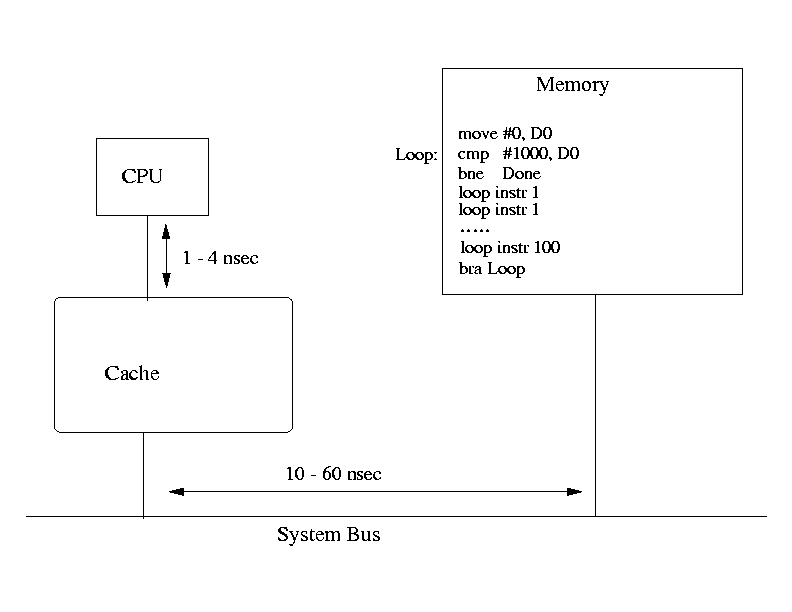
- Cache: a very fast memory module placed near the CPU:
click here.
- The cache memory can hold a part of the content of the memory.
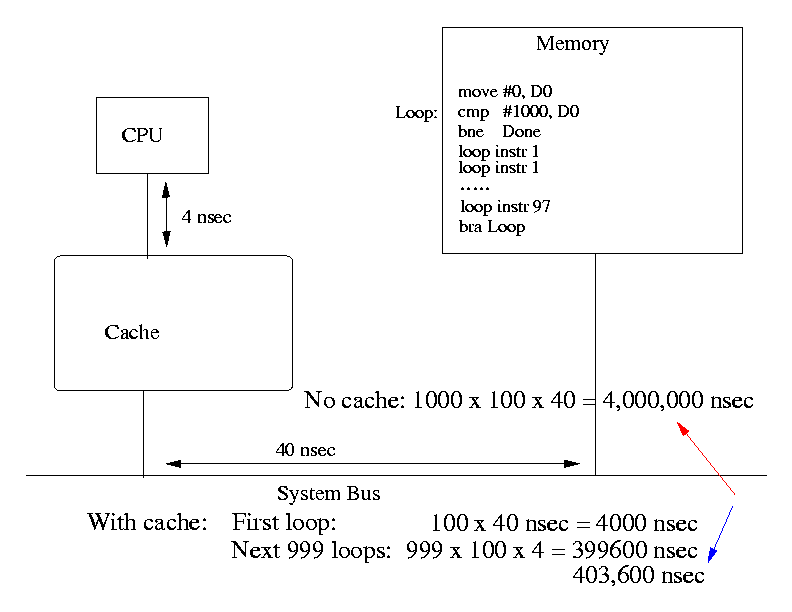
- Cache can speed up program execution significantly
due to program locality.
- Example speedup:
click here.
- Type of caches:
- Associative: very flexible and very expensive to make.
- Direct-Mapped: cheap, but absolutely no flexibility.
- Set-Associative: economical and some flexibility.
- The Associative Cache:
- The memory is divided up into "words".
- each "word" is 32 bits.
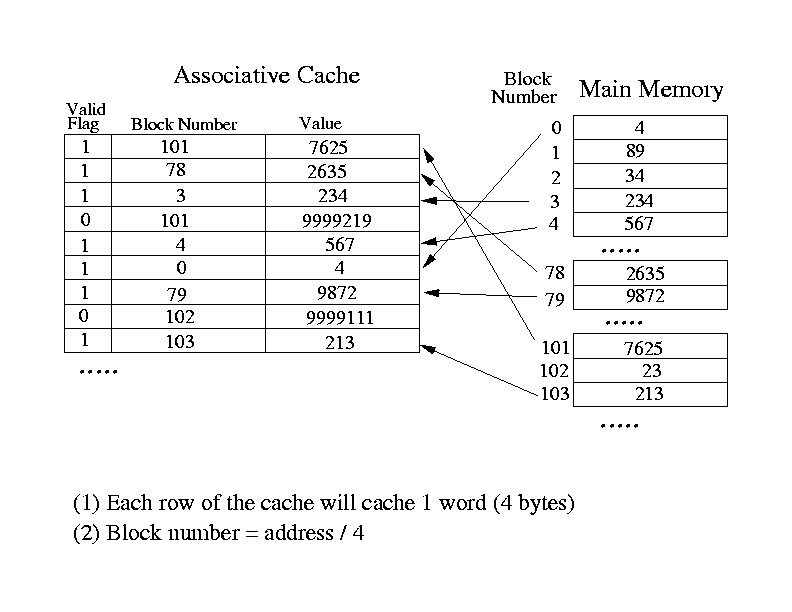
- The address of a "word" is called a "block number".
- Each entry or "slot" can cache a word (32 bits).
- Use the "block number" to identify entries cached:
click here
for an example.
- When CPU sends out the read instruction, the cache will
use the address values sent out by the CPU to look
the block number up in the cache.
If the block number is found, the cache returns the value
to the CPU, otherwise, the cache will start a memory read
cycle to get the data for the CPU.
- One problem: a serial search will take too long.
- Architecture of the Associative Cache:
click here.
- Strength: a slot can cache any word from
any memory location (flexible).
- Weakness: uses one compare circuit per slot.
This make the Associative Cache very expensive....
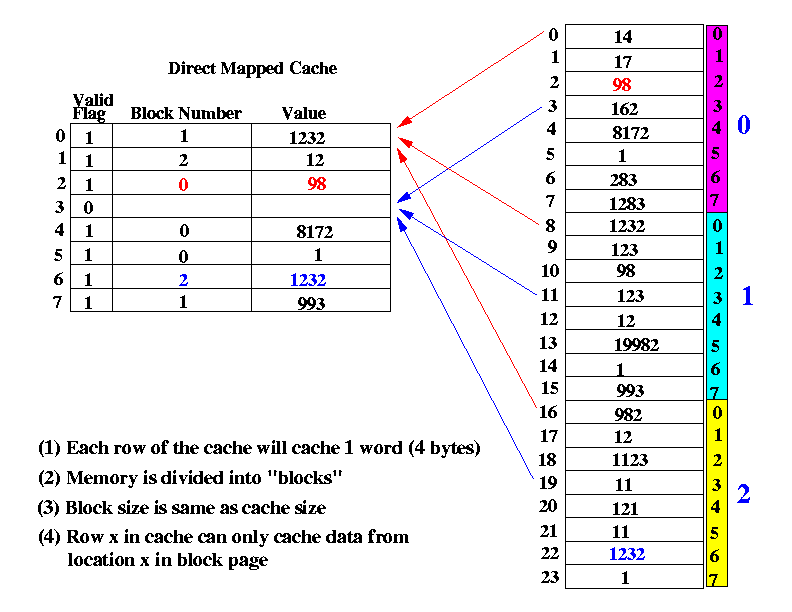
- The Direct-Mapped Cache:
- The memory is also divided into "blocks"
- But each "block" is the same size as the entire
direct mapped cache.
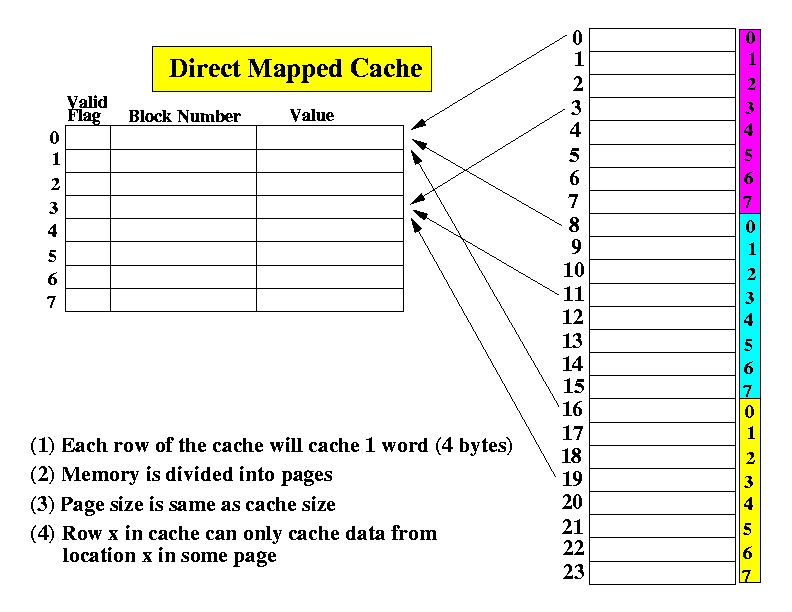
- Each entry or "slot" in cache can only cache a word
(32 bits) at the same location in a page:
click here.
- Click here.
for an example.
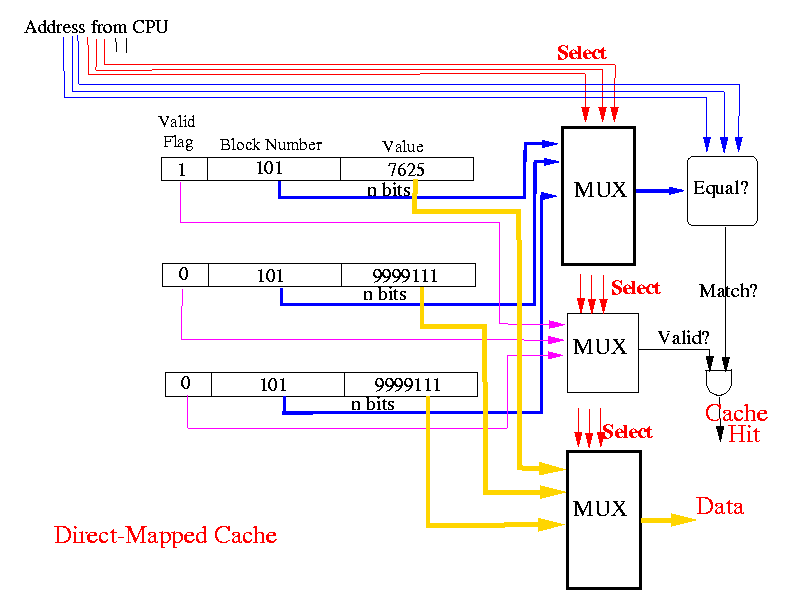
- Architecture of the Direct-Mapped Cache:
click here.
- Strength: lower cost. Main cost is the multiplexor circuits,
which is relatively cheaper to make.
- Weakness: a slot in the cache can only cache a set of
specific word from memory (not flexible).
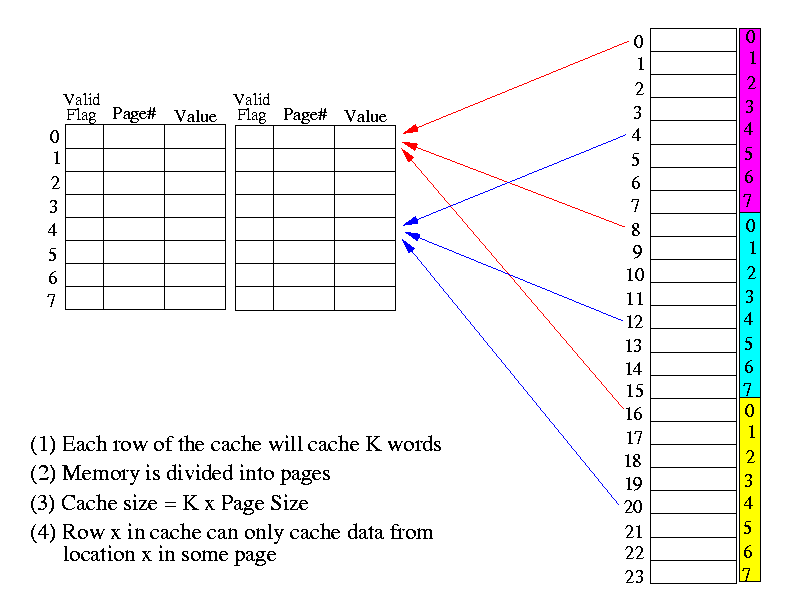
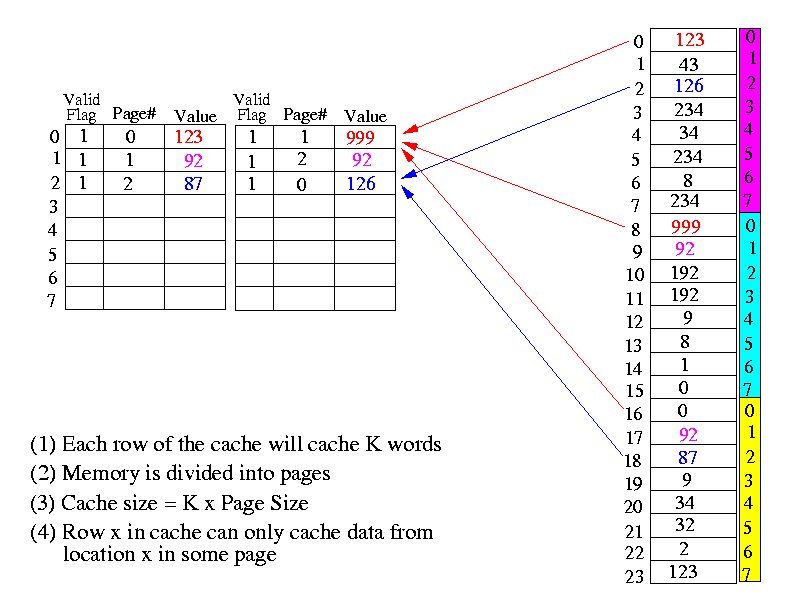
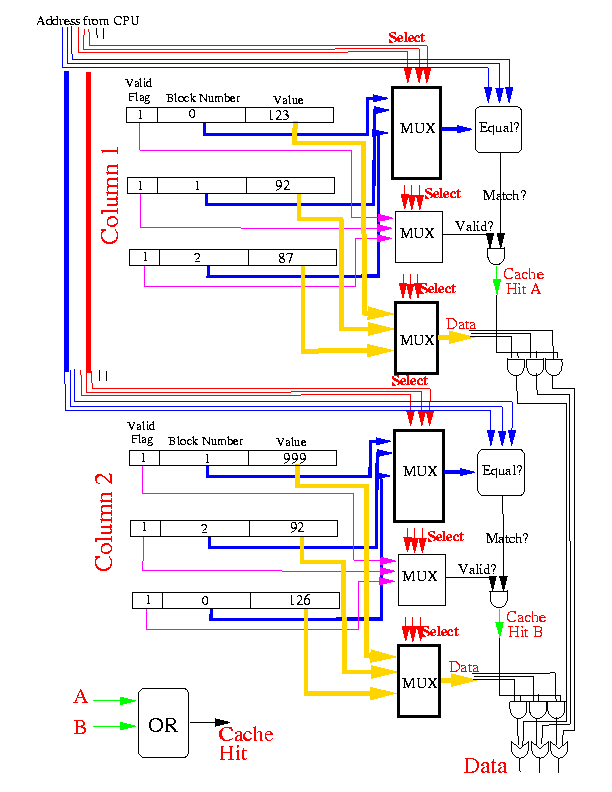
- The Set-Associative Cache: combination of Associative & Direct-Mapped
- Consists of K Direct-Mapped caches.
- Each entry or "slot" in cache can cache K words
at the same location in K different pages:
click here.
- Click here.
for an example.
- Architecture of the Set-Associative Cache:
click here.
- Strength: lower cost. Main cost is the multiplexor circuits,
which is relatively cheaper to make.
- Weakness: a slot in the cache can only cache a set of
specific word from memory (not flexible).
- The Virtual Memory technique
- Parallel Computers
- Introduction:
click here
- SIMD - Single Instruction (stream) and Multiple Data (stream) computers:
click here
- Interconnecting MIMD computers:
click here
- Shared-Memory MIMD Interconnection networks:
- Cross Bar Switch:
click here
- The Delta Multi-stage Interconnection Network (MIN):
click here
- The Omega Multi-stage Interconnection Network:
click here
- Programming Shared Memory MIMD - posix threads:
- Introduction to parallel programming:
click here
- Introduction to threads:
click here
- Creating posix-threads:
click here
- A commonly used parallel program structure (find min):
click here
- Accessing shared memory among threads (compute Pi):
click here
- The reader and write problem
(Semaphore, advanced material
- skip):
click here
- Programming Shared Memory MIMD - OpenMP API:
- Message-Passing MIMD Interconnection networks:
click here
- Algorithms on Message Passing MIMD:
click here
- Programming Message Passing MIMD - MPI:
- Intro to MPI:
click here
- Blocking send and receive operations:
click here
- NON-Blocking send and receive operations:
click here
- Group communication
- broadcast, scatter, reduce and gather operations:
click here
The end.... hope that you have learned a lot in this course... don't stop here,
keep learning... knowledge is power...